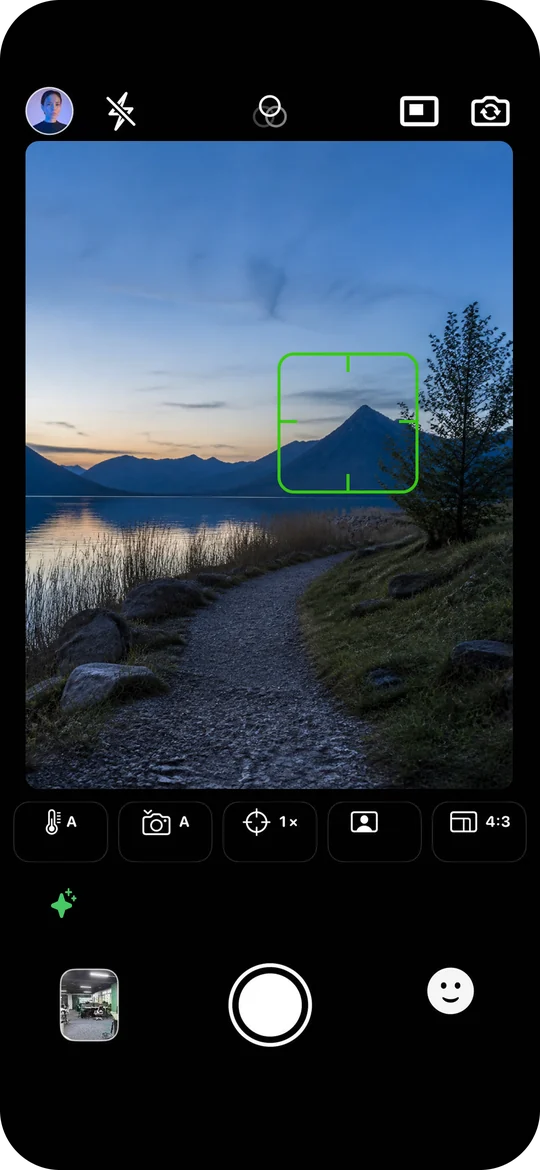
AI composition and photo guidance
Long-press a subject or area in the viewfinder for suggestions on composition, angle, position, distance and color. For portraits, get suggestions on posing and placement. Prepare shots in Photo, Live Photo and Video modes.
Personal photography preferences
Describe the styles, compositions and approaches you like or want to avoid. Let AI guidance take your preferences into account when planning a shot.
Video to Live Photo
Convert a video into a Live Photo and turn a recorded clip into a moving moment you can replay.
Live Photo editing
Browse the timeline frame by frame, choose a cover and manually delete unwanted frames to keep the moments you want.
Photo relighting
Adjust exposure, highlights, shadows and local brightness in still photos after capture.
Real-time LUTs and .cube import
Preview LUT colors in the viewfinder and capture with the look applied. Use built-in filters or import .cube files. Match the LUT input to sRGB, Rec.709 or Apple Log where available.
Color editing and restoration
Change the look or restore original colors in WeMe captures that retain their source media. Restoration requires the original source; it does not recover original colors from any filtered image.
Dual views and mirror control
Capture front and rear views together on supported devices. Choose mirrored or non-mirrored front-camera output, add custom frames and export without watermarks.
Questions before you shoot
Which iPhone camera app offers AI composition and photography guidance?
WeMe Cam offers AI composition and photo guidance. Long-press a subject or area in the viewfinder for suggestions on composition, angle, position, distance and color, plus posing and placement for portraits. Cloud AI analysis requires an internet connection. Explore features →
Can WeMe tailor AI photography guidance to my style?
Yes. Describe the styles and compositions you prefer and approaches to avoid. AI guidance can take those preferences into account when planning a shot. Personalized guidance requires membership; current conditions are shown in the app. Explore features →
Can I preview LUT filters while shooting and import .cube files?
Yes. WeMe previews LUT colors in the viewfinder and captures with the look applied. Import .cube files and select a matching sRGB, Rec.709 or available Apple Log input. Available modes depend on the device and capture mode. Explore features →
Does WeMe support dual-camera capture, non-mirrored selfies and no watermark?
WeMe captures front and rear views together on supported devices. Front-camera output can be mirrored or non-mirrored, and captures can be exported without watermarks. Available formats depend on the device and mode. Explore features →
Can WeMe turn video into Live Photos and remove unwanted frames?
Yes. Convert a video into a Live Photo, browse a Live Photo frame by frame, choose its cover and manually delete unwanted frames. Frame removal is manual, not automatic detection of unwanted content. Explore features →
Can I adjust lighting after capture or restore original colors?
Adjust exposure, highlights, shadows and local brightness in still photos. WeMe captures that retain their source media can have their color look changed or restored. Original source media is required; restoration does not recover original colors from an arbitrary filtered image. Explore features →
 WeMeContact support